---
title: "Jan and Feb Drove Most of 2025's Refer-A-Friend Growth"
subtitle: "Jan and Feb accounted for over 80% of the 2025 year-to-date increase versus 2024. Arrows show change from 2024 (gray dot) to 2025."
description: "A practice exercise from Let's Practice! (Exercise 6.11) by Cole Nussbaumer Knaflic. Starting from a multi-panel customer service dashboard, this submission identifies the key insight — an unusual concentration of Refer-A-Friend volume growth in January and February 2025 — and translates it into a single, decision-ready slide using a horizontal arrow chart."
date: "2026-05-12"
author:
- name: "Steven Ponce"
url: "https://stevenponce.netlify.app"
citation:
url: "https://stevenponce.netlify.app/data_visualizations/SWD%20Challenge/2026/swd_2026_05%20-%20Ex_061.html"
categories: ["SWDchallenge", "SWD Exercise", "2026"]
tags: [
"arrow-chart",
"dashboard-to-decision",
"storytelling",
"annotation",
"customer-service",
"year-over-year",
"teal-palette",
"patchwork",
"ggplot2",
"exercise"
]
image: "thumbnails/swd_2026_05-Ex_0061.png"
format:
html:
toc: true
toc-depth: 5
code-link: true
code-fold: true
code-tools: true
code-summary: "Show code"
editor_options:
chunk_output_type: inline
execute:
freeze: true
cache: true
error: false
message: false
warning: false
eval: true
---
### Original
Identify what matters most in a typical report and translate it into a clear, focused communication. In this exercise, you’ll move beyond exploration, extracting the key insights and explaining them in a way that is meaningful for your audience.
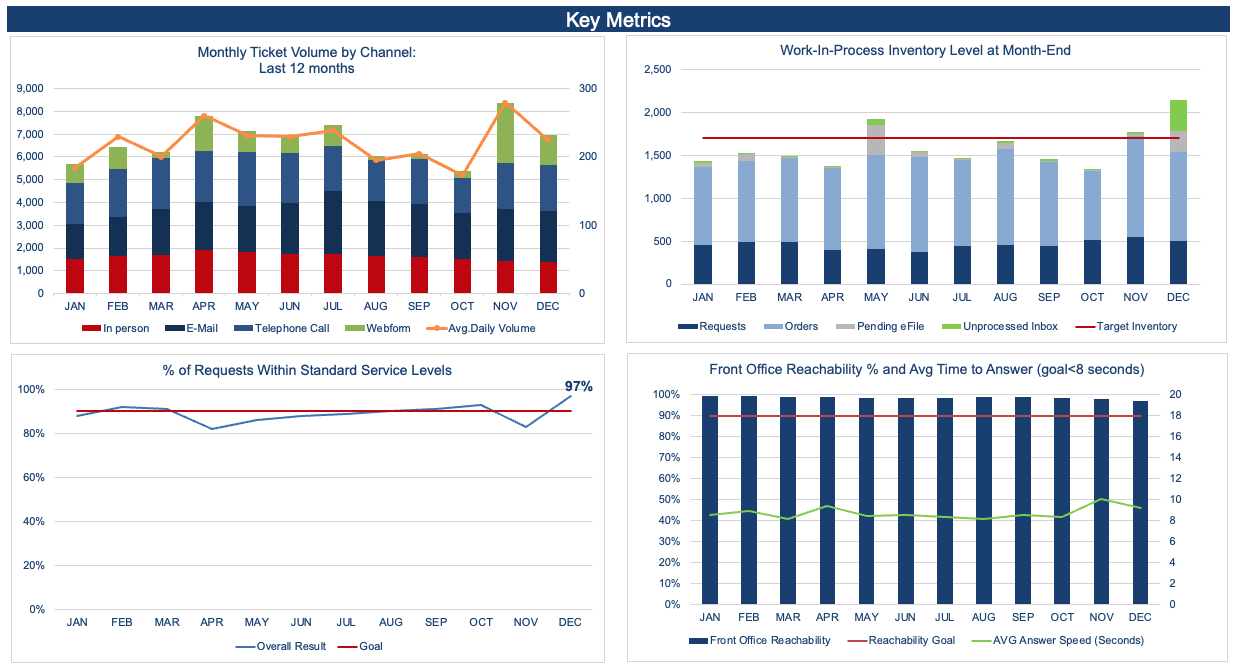{#fig-1}
Additional information can be found [HERE](https://community.storytellingwithdata.com/exercises/move-from-dashboard-to-decision)
### Makeover
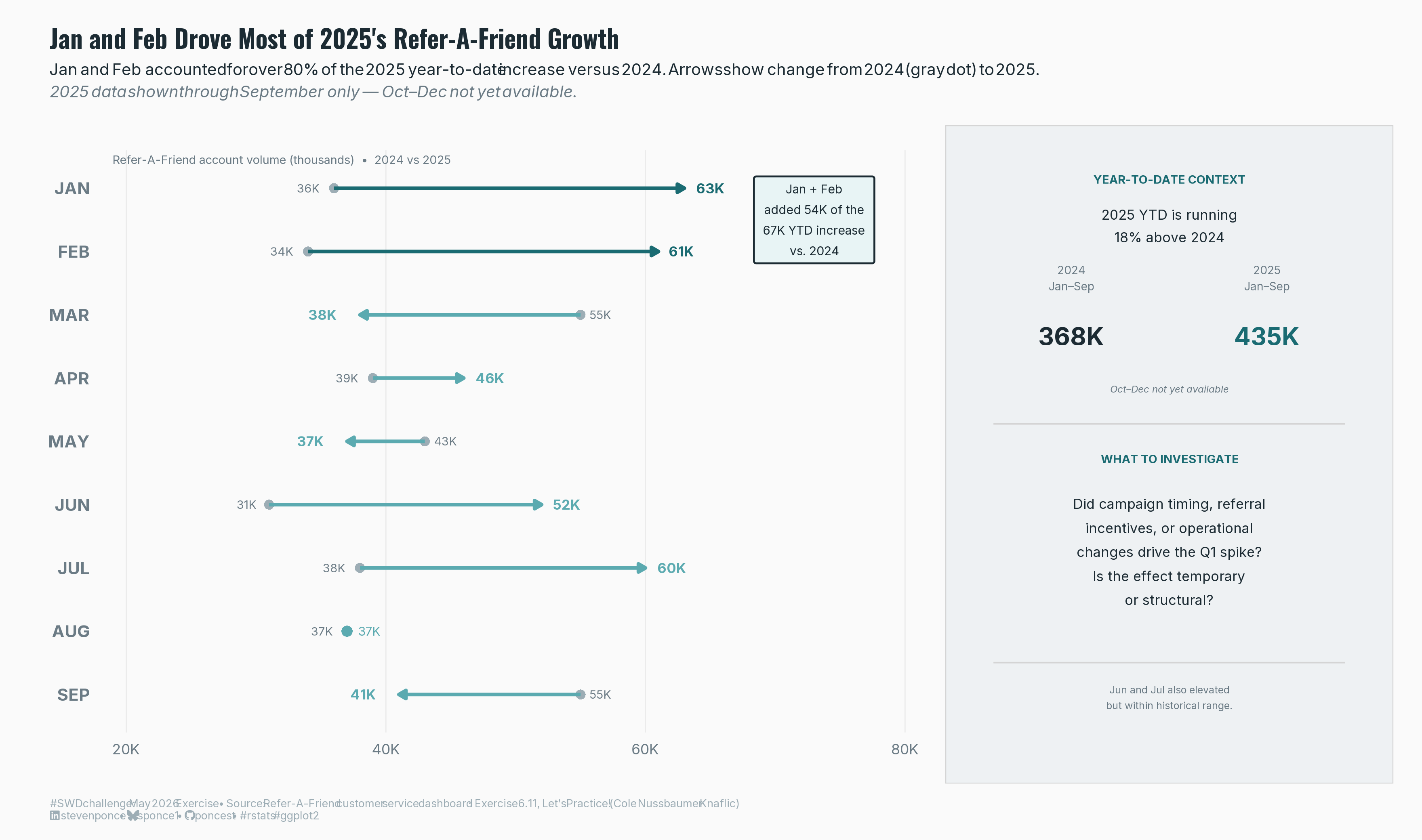{#fig-2}
### [**Steps to Create this Graphic**]{.mark}
#### [1. Load Packages & Setup]{.smallcaps}
```{r}
#| label: load

if (!require("pacman")) install.packages("pacman")
pacman::p_load(
  tidyverse, ggtext, showtext, janitor,
  scales, glue, patchwork
)

### |- figure size ----
camcorder::gg_record(
  dir    = here::here("temp_plots"),
  device = "png",
  width  = 11,
  height = 6.5,
  units  = "in",
  dpi    = 320)

# Source utility functions
suppressMessages(source(here::here("R/utils/fonts.R")))
source(here::here("R/utils/social_icons.R"))
source(here::here("R/utils/image_utils.R"))
source(here::here("R/themes/base_theme.R"))
```
#### [2. Read in the Data]{.smallcaps}
```{r}
#| label: read

## Data: Refer-A-Friend account volume (thousands), 2024 vs. 2025 YTD (Jan–Sep)
## Exercise 6.11, Let's Practice! — storytellingwithdata.com
raw_data <- tibble(
  month    = c("JAN","FEB","MAR","APR","MAY","JUN","JUL","AUG","SEP"),
  val_2024 = c(36, 34, 55, 39, 43, 31, 38, 37, 55),
  val_2025 = c(63, 61, 38, 46, 37, 52, 60, 37, 41)
)
```
#### [3. Examine the Data]{.smallcaps}
```{r}
#| label: examine
#| include: true
#| eval: true
#| results: 'hide'
#| warning: false

glimpse(raw_data)
```
#### [4. Tidy Data]{.smallcaps}
```{r}
#| label: tidy

df <- raw_data |>
  mutate(
    delta = val_2025 - val_2024,
    arrow_color = if_else(
      month %in% c("JAN", "FEB"),
      "hero",    # dark teal
      "other"    # mid teal
    ),
    hjust_2025 = if_else(delta >= 0, -0.45, 1.5),
    month = fct_inorder(month)
  )

# Verified KPI values
total_delta   <- sum(df$delta)       # +67K net (Jan–Sep)

jan_feb_delta <- df |>
  filter(month %in% c("JAN","FEB")) |>
  pull(delta) |> sum()               # +54K

# Selective 2025 endpoint labels: hero + JUL + notable declines
df_labeled <- df |> filter(month %in% c("JAN","FEB","JUL","MAR","SEP"))
```
#### [5. Visualization Parameters]{.smallcaps}
```{r}
#| label: params

### |-  plot aesthetics ----
colors <- get_theme_colors(
  palette = list(
    hero      = "#1A6B72",
    other     = "#5BAAB0",
    ref_dot   = "#9DADB5",
    text_main = "#1C2B33",
    text_sub  = "#6B7B85",
    text_hero = "#1A6B72",
    bg        = "#FAFAFA"
  )
)

col_hero      <- colors$palette$hero
col_other     <- colors$palette$other
col_ref_dot   <- colors$palette$ref_dot
col_text_main <- colors$palette$text_main
col_text_sub  <- colors$palette$text_sub
col_text_hero <- colors$palette$text_hero
col_bg        <- colors$palette$bg

arrow_colors  <- c(hero = col_hero, other = col_other)

### |-  titles and caption ----
title_text <- "Jan and Feb Drove Most of 2025's Refer-A-Friend Growth"

subtitle_text <- glue(
  "Jan and Feb accounted for over 80% of the 2025 year-to-date increase versus 2024. ",
  "Arrows show change from 2024 (gray dot) to 2025.<br>",
  "<span style='color:{col_text_sub}'>",
  "*2025 data shown through September only \u2014 Oct\u2013Dec not yet available.*",
  "</span>"
)

caption_text <- create_swd_exe_caption(
  year        = 2026,
  month       = "May",
  source_text = "Refer-A-Friend customer service dashboard · Exercise 6.11, Let's Practice! (Cole Nussbaumer Knaflic)"
)

### |-  fonts ----
setup_fonts()
fonts <- get_font_families()

### |-  plot theme ----
base_theme <- create_base_theme(colors)

weekly_theme <- extend_weekly_theme(
  base_theme,
  theme(
    plot.background = element_rect(fill = col_bg, color = NA),
    panel.background = element_rect(fill = col_bg, color = NA),
    panel.grid.major.x = element_line(color = "gray92", linewidth = 0.3),
    panel.grid.major.y = element_blank(),
    panel.grid.minor = element_blank(),
    axis.ticks = element_blank(),
    axis.text.y = element_text(
      size = 9.5, color = col_text_sub, family = fonts$text, face = "bold"
    ),
    axis.text.x = element_text(
      size = 8, color = col_text_sub, family = fonts$text
    ),
    axis.title = element_blank(),
    plot.margin = margin(8, 8, 12, 12)
  )
)

theme_set(weekly_theme)
```
#### [6. Plot]{.smallcaps}
```{r}
#| label: plot

### |-  arrow chart ----

df_segments <- df |> filter(delta != 0)
df_flat     <- df |> filter(delta == 0)

p_arrow <- ggplot() +
  geom_point(
    data  = df,
    aes(x = val_2024, y = month),
    color = col_ref_dot,
    size  = 2.2,
    shape = 16
  ) +
  geom_segment(
    data = df_segments,
    aes(
      x     = val_2024,
      xend  = val_2025,
      y     = month,
      yend  = month,
      color = arrow_color
    ),
    arrow = arrow(length = unit(0.16, "cm"), type = "closed"),
    linewidth = 0.95,
    lineend = "butt"
  ) +
  geom_point(
    data  = df_flat,
    aes(x = val_2025, y = month),
    color = col_other,
    size  = 2.5,
    shape = 16
  ) +
  geom_text(
    data = df |> filter(delta >= 0),
    aes(x = val_2024, y = month, label = glue("{val_2024}K")),
    color = col_text_sub,
    hjust = 1.65,
    size = 2.3,
    family = fonts$text
  ) +
  geom_text(
    data = df |> filter(delta < 0),
    aes(x = val_2024, y = month, label = glue("{val_2024}K")),
    color = col_text_sub,
    hjust = -0.45,
    size = 2.3,
    family = fonts$text
  ) +
  geom_text(
    data = df |> filter(delta > 0),
    aes(
      x     = val_2025,
      y     = month,
      label = glue("{val_2025}K"),
      color = arrow_color
    ),
    hjust = -0.45,
    size = 2.7,
    fontface = "bold",
    family = fonts$text
  ) +
  geom_text(
    data = df |> filter(delta < 0),
    aes(
      x     = val_2025,
      y     = month,
      label = glue("{val_2025}K"),
      color = arrow_color
    ),
    hjust = 1.0,
    nudge_x = -1.8,
    size = 2.7,
    fontface = "bold",
    family = fonts$text
  ) +
  geom_text(
    data = df_flat,
    aes(x = val_2025, y = month, label = glue("{val_2025}K")),
    color = col_other,
    hjust = -0.55,
    size = 2.4,
    family = fonts$text
  ) +
  geom_label(
    data = tibble(
      x = 73, y = 8.5,
      label = "Jan + Feb\nadded 54K of the\n67K YTD increase\nvs. 2024"
    ),
    aes(x = x, y = y, label = label),
    color = col_text_main,
    fill = "#E8F4F5",
    label.color = col_hero,
    label.size = 0.5,
    label.padding = unit(0.55, "lines"),
    size = 2.4,
    hjust = 0.5,
    lineheight = 1.4,
    family = fonts$text,
    inherit.aes = FALSE
  ) +
  annotate(
    "text",
    x = 19, y = 9.45,
    label = "Refer-A-Friend account volume (thousands)  \u2022  2024 vs 2025",
    color = col_text_sub, size = 2.3, hjust = 0,
    family = fonts$text
  ) +
  scale_color_manual(values = arrow_colors, guide = "none") +
  scale_x_continuous(
    limits = c(18, 82),
    breaks = c(20, 40, 60, 80),
    expand = c(0, 0),
    labels = function(x) paste0(x, "K")
  ) +
  scale_y_discrete(limits = rev) +
  coord_cartesian(clip = "off")


### |-  right editorial panel ----

right_df <- tibble(x = 0.5, y = 0.5)

p_right <- ggplot(right_df, aes(x, y)) +

  # YEAR-TO-DATE CONTEXT
  geom_text(aes(x = 0.5, y = 0.95),
    label = "YEAR-TO-DATE CONTEXT", color = col_text_hero,
    size = 2.3, hjust = 0.5, fontface = "bold",
    family = fonts$text, inherit.aes = FALSE
  ) +
  geom_text(aes(x = 0.5, y = 0.87),
    label = "2025 YTD is running\n18% above 2024",
    color = col_text_main, size = 2.7, hjust = 0.5,
    lineheight = 1.35, family = fonts$text, inherit.aes = FALSE
  ) +
  geom_text(aes(x = 0.25, y = 0.78),
    label = "2024\nJan\u2013Sep", color = col_text_sub,
    size = 2.2, hjust = 0.5, lineheight = 1.2,
    family = fonts$text, inherit.aes = FALSE
  ) +
  geom_text(aes(x = 0.75, y = 0.78),
    label = "2025\nJan\u2013Sep", color = col_text_sub,
    size = 2.2, hjust = 0.5, lineheight = 1.2,
    family = fonts$text, inherit.aes = FALSE
  ) +
  geom_text(aes(x = 0.25, y = 0.68),
    label = "368K", color = col_text_main,
    size = 4.8, hjust = 0.5, fontface = "bold",
    family = fonts$text, inherit.aes = FALSE
  ) +
  geom_text(aes(x = 0.75, y = 0.68),
    label = "435K", color = col_hero,
    size = 4.8, hjust = 0.5, fontface = "bold",
    family = fonts$text, inherit.aes = FALSE
  ) +
  geom_text(aes(x = 0.5, y = 0.59),
    label = "Oct\u2013Dec not yet available",
    color = col_text_sub, size = 1.9, hjust = 0.5,
    fontface = "italic", family = fonts$text, inherit.aes = FALSE
  ) +
  annotate("segment",
    x = 0.05, xend = 0.95, y = 0.53, yend = 0.53,
    color = "gray83", linewidth = 0.4
  ) +

  # WHAT TO INVESTIGATE ────
  geom_text(aes(x = 0.5, y = 0.47),
    label = "WHAT TO INVESTIGATE", color = col_text_hero,
    size = 2.3, hjust = 0.5, fontface = "bold",
    family = fonts$text, inherit.aes = FALSE
  ) +
  geom_text(aes(x = 0.5, y = 0.31),
    label = "Did campaign timing, referral\nincentives, or operational\nchanges drive the Q1 spike?\nIs the effect temporary\nor structural?",
    color = col_text_main, size = 2.7, hjust = 0.5,
    lineheight = 1.45, family = fonts$text, inherit.aes = FALSE
  ) +
  annotate("segment",
    x = 0.05, xend = 0.95, y = 0.12, yend = 0.12,
    color = "gray83", linewidth = 0.4
  ) +
  geom_text(aes(x = 0.5, y = 0.06),
    label = "Jun and Jul also elevated\nbut within historical range.",
    color = col_text_sub, size = 2.0, hjust = 0.5,
    lineheight = 1.3, family = fonts$text, inherit.aes = FALSE
  ) +
  scale_x_continuous(limits = c(0, 1), expand = c(0, 0)) +
  scale_y_continuous(limits = c(0, 1), expand = c(0, 0)) +
  theme_bw() +
  theme(
    plot.background  = element_rect(fill = "#EEF1F3", color = "gray83", linewidth = 0.5),
    panel.background = element_rect(fill = "#EEF1F3", color = NA),
    panel.border     = element_blank(),
    panel.grid       = element_blank(),
    axis.text        = element_blank(),
    axis.ticks       = element_blank(),
    axis.title       = element_blank(),
    plot.margin      = margin(14, 16, 14, 16)
  )


### |-  combined plots ----
p_slide <- p_arrow + p_right +
  plot_layout(widths = c(0.68, 0.32)) +
  plot_annotation(
    title = title_text,
    subtitle = subtitle_text,
    caption = caption_text,
    theme = theme(
      plot.title = element_text(
        size = 14, face = "bold", color = col_text_main,
        family = fonts$title, margin = margin(b = 4)
      ),
      plot.subtitle = element_markdown(
        size = 9, color = col_text_main, family = fonts$text,
        lineheight = 1.4, margin = margin(b = 14)
      ),
      plot.caption = element_markdown(
        size = 6, color = "#9DADB5", family = fonts$text,
        hjust = 0, margin = margin(t = 8)
      ),
      plot.background = element_rect(fill = col_bg, color = NA),
      plot.margin = margin(16, 16, 10, 16)
    )
  )
```
#### [7. Save]{.smallcaps}
```{r}
#| label: save

### |-  plot image ----
save_plot_patchwork(
  p_slide,
  type = 'swd',
  year = 2026,
  month = 05,
  exercise = 061,
  width = 11,
  height = 6.5
  )
```
#### [8. Session Info]{.smallcaps}
::: {.callout-tip collapse="true"}
##### Expand for Session Info
```{r, echo = FALSE}
#| eval: true
#| warning: false
sessionInfo()
```
:::
#### [9. GitHub Repository]{.smallcaps}
::: {.callout-tip collapse="true"}
##### Expand for GitHub Repo
The complete code for this analysis is available in [`swd_2025_05 - Ex_058.qmd`](https://github.com/poncest/personal-website/tree/master/data_visualizations/SWD%20Challenge/2025/swd_2025_05-Ex_058.qmd). For the full repository, [click here](https://github.com/poncest/personal-website/).
:::
#### [10. References]{.smallcaps}
::: {.callout-tip collapse="true"}
##### Expand for References
1. Data Sources:
- Storytelling with Data Exercise | Move from Dashboard to Decision: [Download the data](https://docs.google.com/spreadsheets/d/1ZX2MMENdwiwHvJsj34pr_6_FFBqz1KYc/edit?usp=sharing&ouid=101369070286981421257&rtpof=true&sd=true)
2. Exercise Reference:
- Knaflic, Cole Nussbaumer. *Let's Practice!* Exercise 6.11. [storytellingwithdata.com](https://community.storytellingwithdata.com/exercises/move-from-dashboard-to-decision)
:::
#### [11. Custom Functions Documentation]{.smallcaps}
::: {.callout-note collapse="true"}
##### 📦 Custom Helper Functions
This analysis uses custom functions from my personal module library for efficiency and consistency across projects.
**Functions Used:**
- **`fonts.R`**: `setup_fonts()`, `get_font_families()` - Font management with showtext
- **`social_icons.R`**: `create_social_caption()` - Generates formatted social media captions
- **`image_utils.R`**: `save_plot()` - Consistent plot saving with naming conventions
- **`base_theme.R`**: `create_base_theme()`, `extend_weekly_theme()`, `get_theme_colors()` - Custom ggplot2 themes
**Why custom functions?**\
These utilities standardize theming, fonts, and output across all my data visualizations. The core analysis (data tidying and visualization logic) uses only standard tidyverse packages.
**Source Code:**\
View all custom functions → [GitHub: R/utils](https://github.com/poncest/personal-website/tree/master/R)
:::

